Quikly for business
One platform for bookings, clients, and payments
Quikly Booking Platform (Quikly) is appointment booking and clinic operations software operated at bookquikly.com. Explore online booking, multi-branch calendars, POS, invoicing, inventory, and clinic tools, including Google Meet and Zoom for teleconference or online consultation with patients. This page is public and does not require a login. Built in NZ, trusted in AU.
Run your calendar with confidence
Book appointments, block time, and check out from one calendar that works on desktop and mobile.
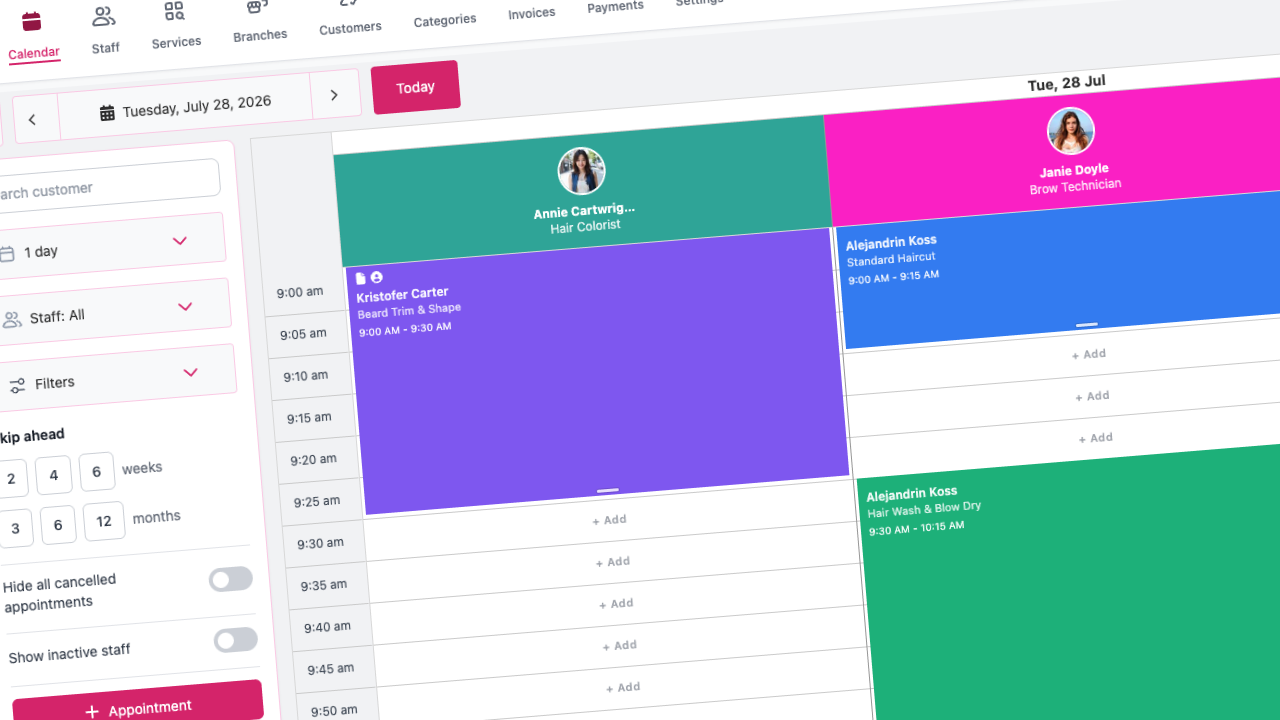
Team calendar
View staff availability, create and edit appointments, and manage time blocks from a single calendar.
Appointment checkout
Take payment at the end of a visit with cash, bank transfer, card, EFTPOS, or unified checkout flows.
Services & categories
Organise your menu with categories, reorder services, bulk upload, and link correspondence to services.
Business hours
Set opening hours per branch so online booking and in-house scheduling stay aligned.
Repeat appointments
Book daily, weekly, fortnightly, monthly, or custom repeating series from the calendar when enabled.
Calendar sync
Connect Google or Microsoft calendars to reduce double-bookings and keep personal and work schedules in sync.
Appointment notes
Add notes to appointments so your team has context before and after each visit.
Every location, one platform
Unlimited branches with separate calendars, hours, staff rosters, and online booking links. Included on every plan.
Unlimited branches
Add locations with their own address, timezone, branding, and booking settings. No per-branch subscription fee.
Branch calendar switcher
View one branch at a time on the staff calendar. Appointments, business hours, and staff columns follow the location you select.
Per-branch online booking
Each location gets its own public booking URL. Customers only see staff and times for that site.
Staff schedules per branch
Set working hours and lunch breaks separately for every branch a team member covers.
Staff across locations
Assign team members to multiple branches. A booking at one site blocks that person at the same time elsewhere.
Branch-scoped reporting
Filter dashboards, payments, and reports by branch while keeping one partner account.
Let clients book anytime
Your profile link runs a branded booking flow for services, staff, times, and secure checkout.
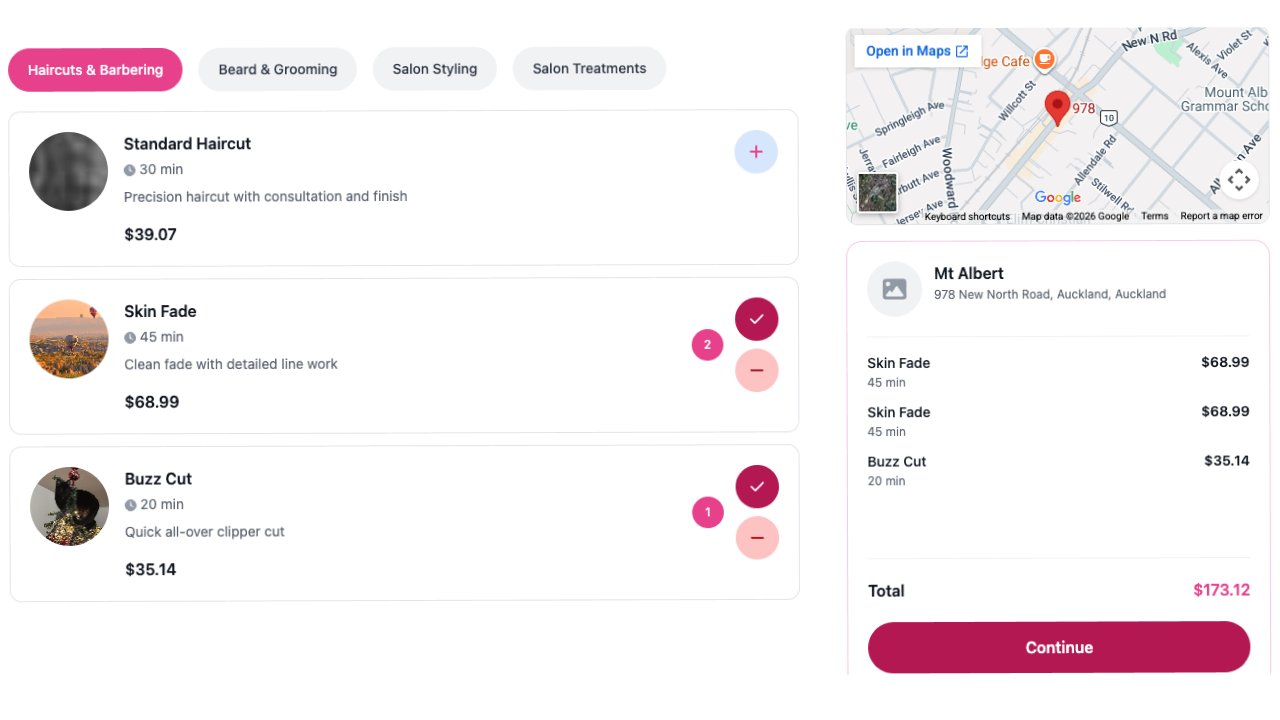
24/7 online booking
Clients choose services, staff, and time slots from any device through your unique booking link for each branch.
Public business profile
Share your Quikly profile page with services, branches, and reviews to convert visitors into bookings.
Booking fees & deposits
Secure bookings with upfront fees via Stripe or POLi, with policies you control per branch.
Consultation requests
Capture consultation enquiries before a full appointment is booked.
Reschedule & rebook
Logged-in clients can reschedule appointments or rebook favourites from the customer dashboard.
Embeddable booking
Embed the booking experience on your website with a dedicated, secure widget flow.
Publish a business website for free
Build and publish a branded site with pages, catalogs, and a contact form—included on every plan.
Drag-and-drop pages
Compose home, about, services, products, and custom pages with blocks you can edit anytime.
Services & products catalogs
Showcase your live service menu and retail products, with images pulled from your Quikly catalog.
Branding controls
Set site title, colours, logo, and banner so the published site matches your brand.
Contact form
Let visitors send enquiries from your site so new leads land with your team.
Subdomain or custom domain
Publish on a Quikly subdomain, or connect your own domain when you are ready.
Book from the site
Link straight into online booking so website visitors can reserve a time in a few taps.
Know every client in one place
Keep profiles, history, files, payments, passes, and communications in one place.
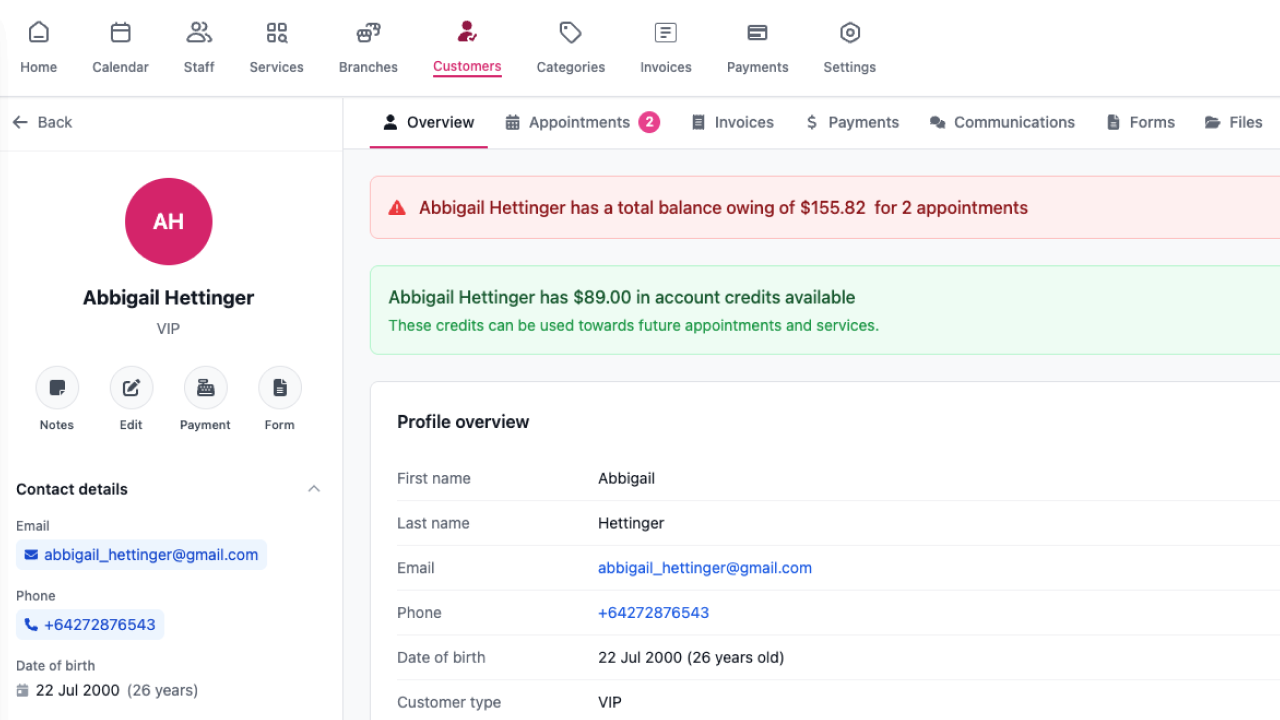
Client profiles
See appointments, payments, invoices, vouchers, concessions, and message history on one profile.
Documents & files
Upload and archive client files so important paperwork stays with the record.
Bulk import
Bring existing client lists into Quikly with CSV upload workflows.
Family members
Customers can manage family members on their account for bookings on behalf of others.
Reviews
Collect feedback after visits and publish selected reviews on your public profile.
Customer portal
Clients sign in to manage profile, appointments, loyalty, vouchers, and concession balances.
Empower staff with the right access
Individual logins, roles, and performance visibility for growing teams.
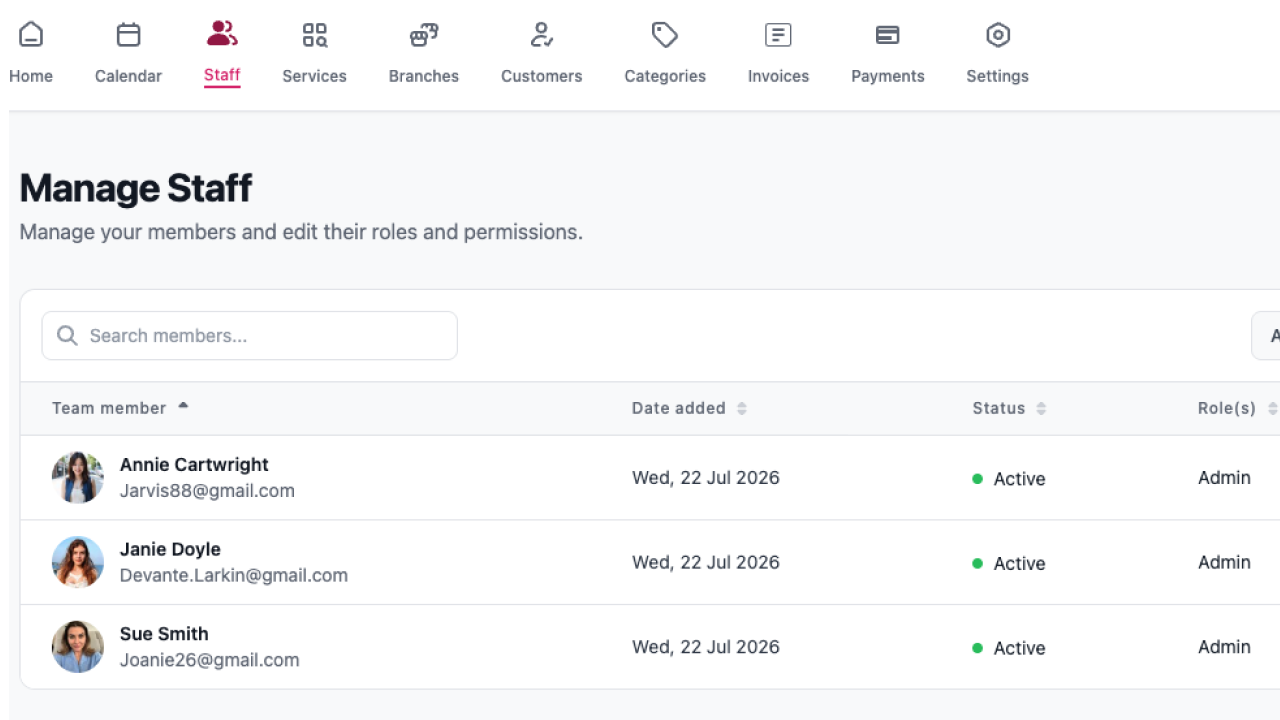
Staff accounts
Each team member gets their own login and workspace under your business.
Custom permissions
Control who can view calendar, clients, reports, settings, checkout, and more with role-based access.
Staff performance
Track booking and revenue contribution with staff performance reporting.
Shift scheduling
Plan working hours per branch with day buttons, split shifts, and lunch gaps that online booking respects.
Menu customization
Rename and hide navigation items so each role sees a simplified, relevant menu.
Audit log
Review actions taken by staff across your organisation for accountability.
Get paid online and in-store
Take payments with tools built for NZ and AU businesses. No commission on appointment revenue.
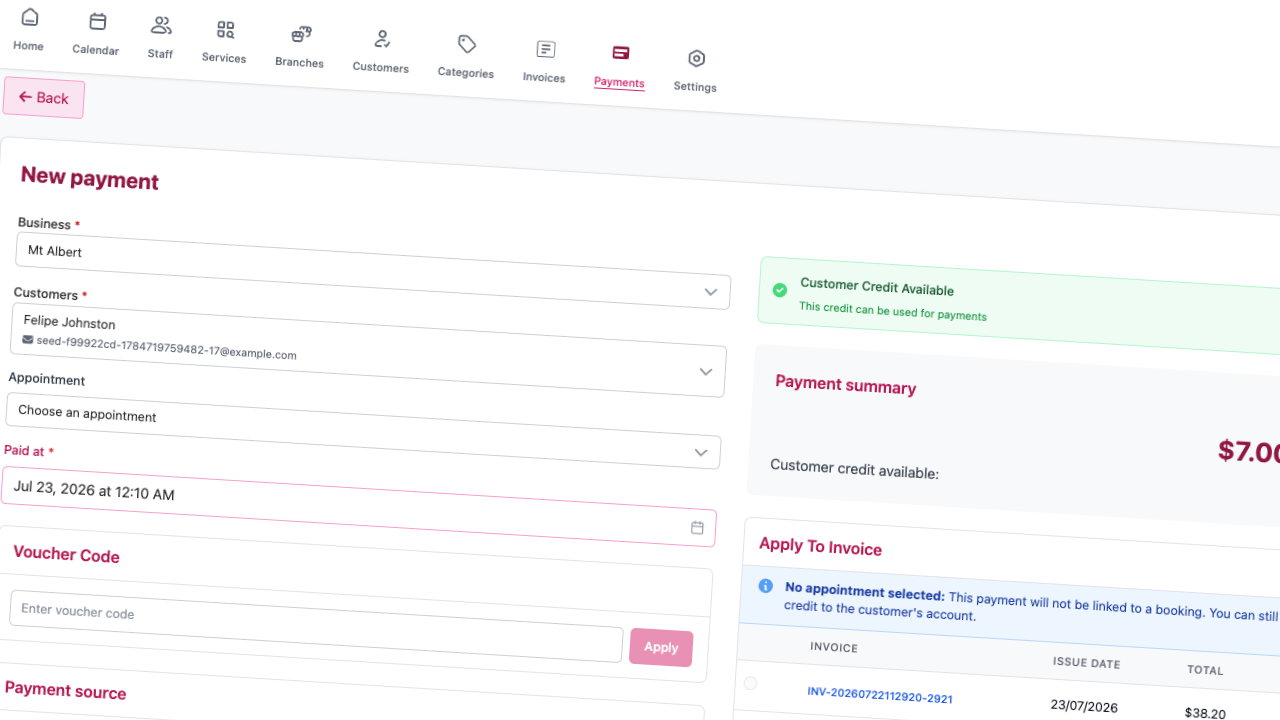
Point of sale
Ring up services and products in-store with an integrated POS screen and checkout.
EFTPOS terminals
Connect Windcave-style terminals, test connections, and take in-person card payments.
Stripe & POLi
Accept cards and POLi for booking fees, vouchers, concessions, and online checkout.
Multiple tender types
Record cash, bank transfer, card, and combined payments from calendar or POS.
Zero commission
Keep your appointment revenue. Quikly does not take a cut of each booking you complete.
Payment records
Email receipts, edit payments, and maintain a clear ledger of every transaction.
Bill clearly and get paid faster
Create invoices, send them by email, and track paid and outstanding amounts.
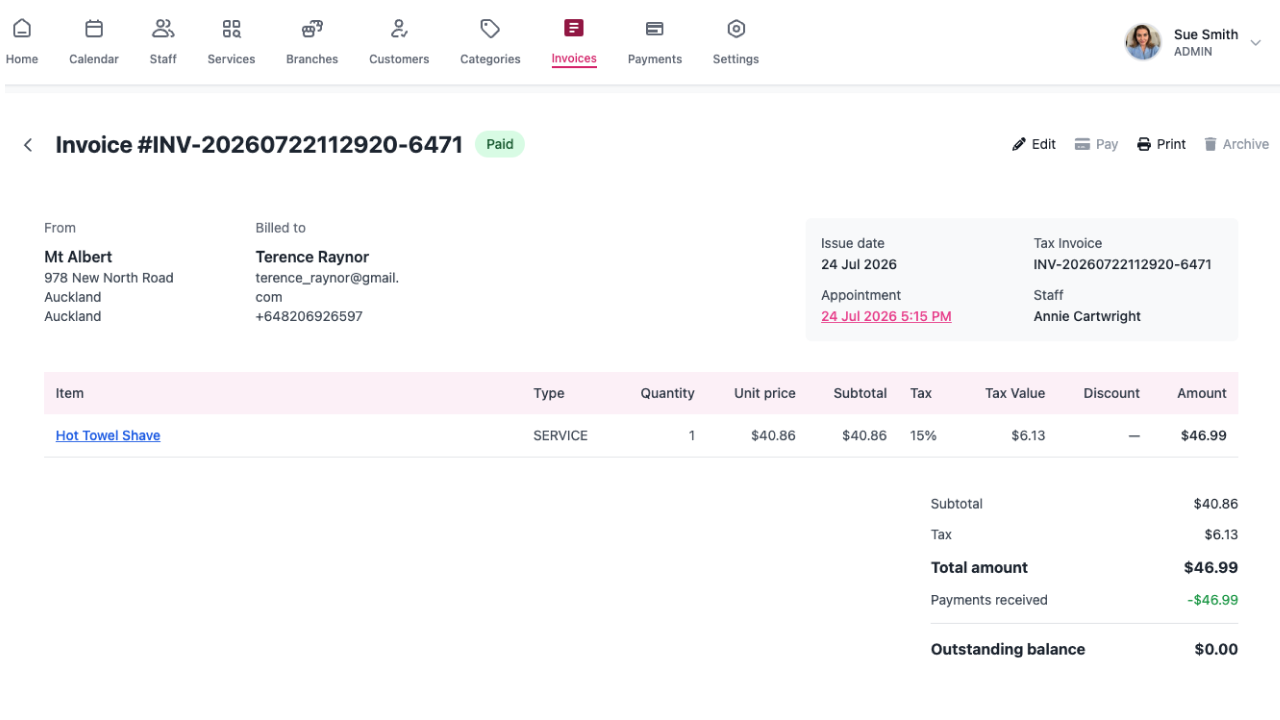
Invoice creation
Build invoices with line items, taxes, and services or products from your catalog.
Send & track
Mark invoices sent or paid and email PDFs directly to clients.
Payments module
Record standalone payments linked to clients and appointments when invoices are not needed.
Tax settings
Configure tax rates once and apply them consistently across invoices and checkout.
Uninvoiced appointments
Reporting surfaces completed visits that still need billing so nothing slips through.
Financial reports
Summarise revenue and payment activity across branches and date ranges.
Sell products and track stock
Product catalog, branch stock, suppliers, and stock history in one system.
Product catalog
Create and archive retail products with pricing for POS and checkout.
Branch stock
See stock levels per location and adjust quantities when counts change.
Stock input & adjustments
Receive stock deliveries and post adjustments with a full history trail.
Suppliers
Maintain supplier records linked to your inventory workflows.
Stock by location
Retail inventory stays separate per branch so each site knows what is on the shelf.
Sell at checkout
Add products to appointment checkout or POS alongside services.
Reward clients and fill your calendar
Vouchers, concession passes, loyalty points, and referrals to drive repeat business.
Discount vouchers
Create promotional codes clients can apply during online or in-house checkout.
Concession passes
Sell session packages, class passes, and time-based passes with usage tracking.
Public purchase
Clients buy vouchers and concessions from your booking link or customer dashboard.
Loyalty rewards
Earn points on paid visits and let clients exchange points for vouchers at checkout.
Referrals
Track referral activity as you grow through word of mouth.
Reactivation reporting
Identify inactive clients and focus outreach with dedicated reports.
Stay in touch automatically
Email and SMS templates, reminders, and a monitor to see what was sent.
Confirmations & cancellations
Branded email templates when appointments are booked, changed, or cancelled.
Appointment reminders
Send scheduled email and SMS reminders to cut no-shows. Link them to the services you choose.
Follow-up messages
Send post-visit follow-ups to thank clients and encourage rebooking.
SMS credits
Purchase SMS packs, track usage per branch, and see delivery status via Twilio.
Correspondence monitor
Inspect sent, queued, and failed messages and requeue when needed.
Google Reviews prompts
Integration to invite happy clients to leave Google Reviews after their appointment.
Clinical documentation when you need it
Intake forms, treatment notes, body charts, and ACC settings for allied health and clinics.
Patient form templates
Build digital intake forms from a template gallery so clients can complete them before they arrive.
Public secure forms
Share links with access codes; responses autosave and land on the client profile.
Treatment note templates
Structured clinical notes linked to services, with import helpers from other systems.
Treatment records
Document visits on appointments, export PDFs, or send notes to Dropbox.
Body chart templates
Visual assessment charts for physiotherapy, massage, and similar practices.
ACC module (NZ)
Configure ACC vendors, practitioners, certificates, and service codes for eligible practices.
Understand how your business is performing
Dashboard metrics and detailed reports across sales, clients, and team activity.
Dashboard analytics
Daily sales and appointment trends with week-on-week comparisons per branch.
Daily sales
Drill into daily totals and download CSV for accounting or deeper analysis.
Appointments schedule
Report on upcoming and historical appointment volumes and summaries.
Customer analytics
Understand visit patterns, retention, and client behaviour over time.
Staff performance
Compare team members on bookings and revenue for the periods you care about.
AI business insights
Optional integration to surface patterns in bookings, retention, and revenue (where enabled).
Google Meet and Zoom for online consultations
Quikly Booking Platform (Quikly, bookquikly.com) is appointment booking and clinic software for businesses. We use Google Meet and Zoom so practitioners can hold a teleconference or online consultation with a patient for a booked appointment. This page is public. You do not need to sign in to read how the product works or why we request Google access.
What Quikly is
Quikly Booking Platform lets businesses take online bookings, run a staff calendar, send reminders, take payment, and keep client records. Google Meet is one optional integration inside that booking workflow, not a standalone video product.
Google Meet
When a service is set to Google Meet, Quikly creates a Google Meet video meeting for that booked appointment and stores the join details on the appointment. The practitioner and patient use that link for a standard Google Meet call hosted by Google.
Why we request Google user data
Staff connect a Google account so Quikly can create and attach a Google Meet meeting for a teleconference appointment. We request Google account identity (such as email and name) and permission to create the meeting for that booking. We do not request Google access for advertising, contact scraping, or unrelated inbox or Drive use.
Zoom
Use Zoom the same way for teleconference or online consultation with patients. Connect Zoom in settings, enable it on a service, and Quikly Booking Platform creates a Zoom meeting for that booked appointment.
How a session is created
Staff connect Google Meet or Zoom under Settings, Integrations. They choose the provider on the relevant service. When a patient books that service, the meeting details are stored on the appointment for both sides to join from the confirmation, reminder, or calendar.
Patient and practitioner access
Patients and practitioners open the meeting from the appointment, confirmation, or reminder. The video call itself is hosted by Google Meet or Zoom. Quikly does not record the call or replace Google Meet with a custom in-app player.
Connect the tools you already use
Turn on calendars, payments, storage, and feedback from your settings.
Google & Microsoft SSO
Sign in staff and customers with Google or Microsoft where you enable it.
Dropbox
Sync folders and export treatment documentation to your connected account.
Customer feedback
Gather post-visit feedback and satisfaction signals to improve service quality.
Data migration
Import branches, services, products, customers, and staff from CSV when you switch systems.
Short links
Share compact links that redirect to booking, forms, or campaigns.
Subscription plans
Solo, Starter, and Custom tiers share the same core features. Scale by staff count.
Ready to see it in your business?
All plans include the same features. Pay only for the staff you need. Start with a 7-day free trial, or get 2 months free with annual billing. No commission on appointments.